5 Best 3 Zone Sprinkler Timer In 2026
If you’re tired of dragging the hose around your yard or trying to remember when you last watered your plants, a 3 zone sprinkler timer is about to become your favorite garden tool. Trust me, once you set one up, you’ll wonder how you ever managed without it.
In this article
Why Your Garden Needs a 3 Zone Sprinkler Timer
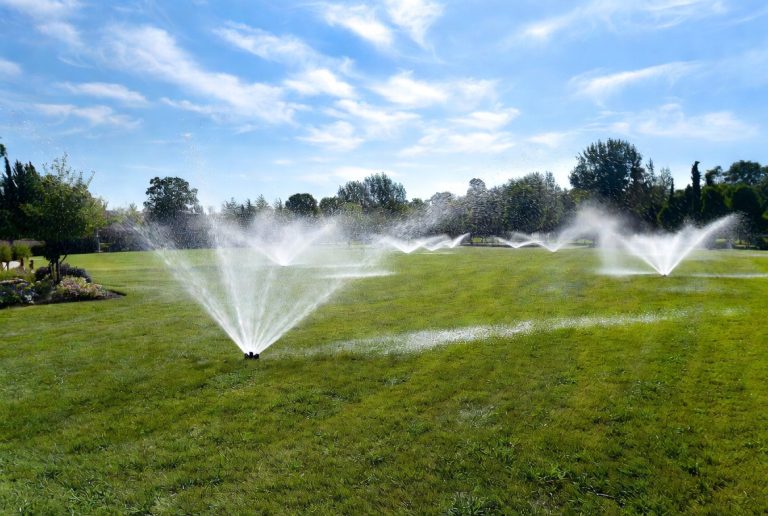
Let me be real with you. Watering your yard by hand is tedious, inconsistent, and honestly, it’s easy to forget. Your lawn, garden beds, and vegetable patches all have different water needs. Your front lawn might need water every two days, while your shade garden prefers less frequent but deeper watering. That’s where a 3 zone sprinkler timer changes everything.
A 3 zone system lets you control three different areas of your yard independently. Each zone runs on its own schedule. You can set zone one for your lawn, zone two for flower beds, and zone three for vegetables or shrubs. No more guessing games. No more overwatering some areas while others dry out. Just smart, automatic watering that works while you sleep, work, or relax on your porch.
The best part? These timers take the stress out of outdoor watering. You set it once and forget about it. Then you enjoy the results—greener grass, healthier plants, and lower water bills.
RAINPOINT 3 Zone Water Timer with Brass Inlet & Outlet
Product Overview
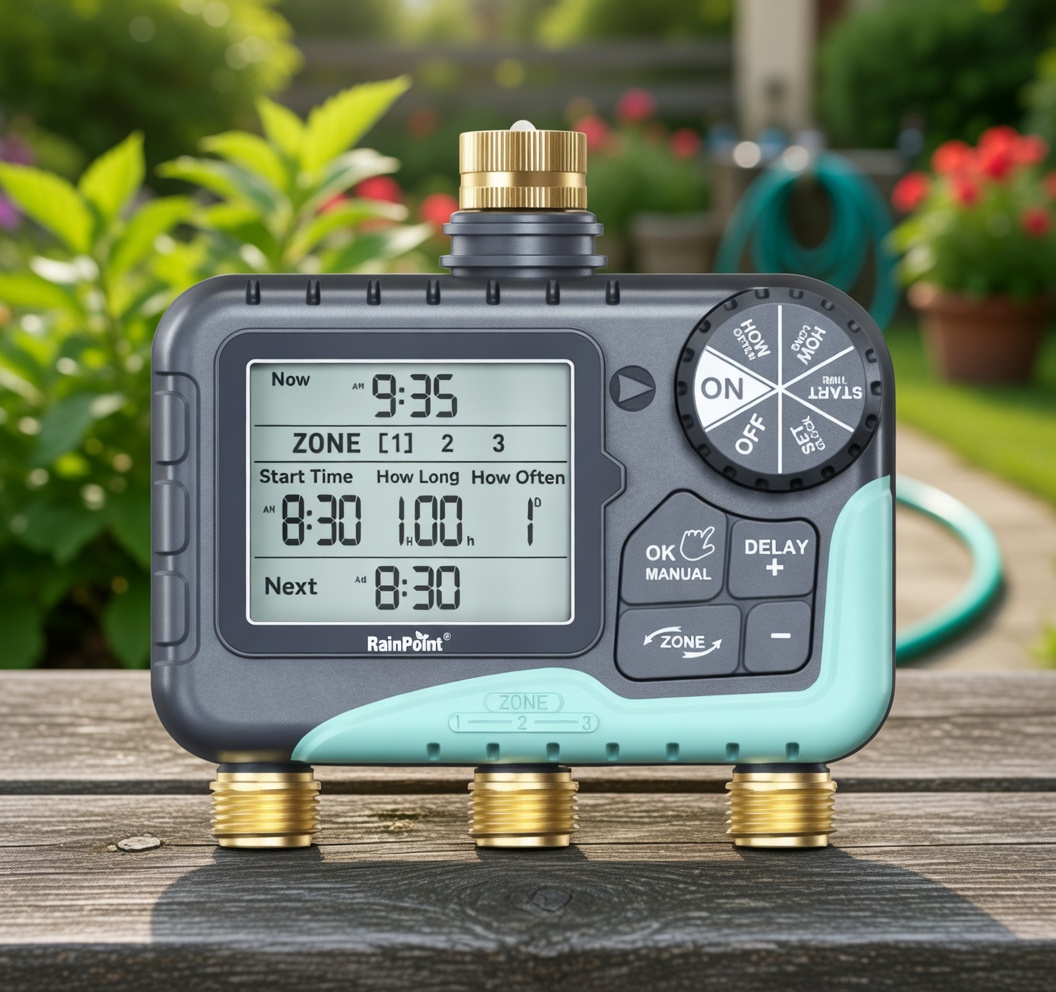
The RAINPOINT 3 Zone Water Timer is a solid, reliable choice for homeowners who want straightforward automatic watering. This timer connects directly to your outdoor faucet and gives you control over three separate irrigation zones. It’s built tough with brass inlet and outlet connections that resist corrosion.
The unit features a large LCD screen that shows you everything at a glance. No squinting to see tiny buttons or unclear displays here. The menu system is logical and easy to navigate, which means setup takes about ten minutes instead of an hour of frustration.
Best Use Cases
This RAINPOINT model shines for homeowners with moderate-sized yards who want reliable, no-fuss watering. It’s perfect if you have separate watering needs across different areas. Think of it as ideal for someone with a lawn section, a decorative garden bed, and maybe some potted plants or a side yard. It handles zone switching smoothly without complicated programming.
It works great for people who travel occasionally too. Set the watering schedule before you leave, and your plants get their drink while you’re at the beach or visiting family. You don’t need WiFi or smartphone apps—just reliable mechanics doing their job.
Key Features Explained
The 3 custom watering plans mean you get three complete independent schedules. Zone one might water at dawn for six minutes. Zone two waters at dusk for three minutes. Zone three runs a weekend-only schedule. Each zone knows nothing about the others.
IP65 waterproof rating means this timer laughs at rain, splashes, and humidity. It won’t fail during a thunderstorm or get damaged by a stray garden hose spray. The sealed design keeps moisture out and electronics safe.
Rain delay is genuinely useful. If natural rain falls, you press the rain delay button and the timer skips watering for two to five days. Your plants don’t get drowned by both rain and irrigation. It’s a simple feature that prevents overwatering and saves water.
The manual and automatic watering modes give you flexibility. Automatic handles everything on schedule. Manual mode lets you turn zones on or off instantly without affecting your programmed schedule. Need to soak a specific area? Just hit manual and choose your zone.
Real-Life Usage Insight
In practice, people report that the RAINPOINT timer stays consistent across an entire season. The LCD display remains readable in direct sunlight—no glare issues like some competitors. Battery life is solid, typically lasting a full year before needing a change.
Setup involves connecting the timer to your faucet, connecting hoses to each zone outlet, and placing hoses or sprinklers in your yard. Most people finish in under fifteen minutes. The instruction booklet is clear with diagrams, so you’re not deciphering confusing technical jargon.
The buttons respond quickly and don’t feel cheap or flimsy. They’re plastic, sure, but durable plastic that handles repeated clicking season after season. People who’ve had theirs for years still find it working smoothly.
Honest Pros and Cons
Pros:
- Easy setup and straightforward menu system
- Excellent waterproof construction with brass fittings
- Large, readable LCD screen
- Independent zone programming
- Good battery life
- Rain delay functionality
- Affordable price point
Cons:
- No WiFi or smartphone control—must program manually
- Battery compartment can be tricky to access in some units
- No smart home integration with Alexa or Google Home
- Limited customization compared to WiFi models
Performance Discussion
This timer performs reliably day in and day out. Water flow is consistent, and zones switch smoothly without drops in pressure. The solenoid valves that control each zone are industrial-grade and don’t get stuck or sluggish.
Consistency is the real strength here. It delivers the same watering schedule reliably for months. No missed watering cycles. No random timer resets. Just dependable automation.
Ease of Use Rating
Setting up this timer takes about five to ten minutes. The manual is clear, diagrams are helpful, and the buttons are intuitive. Programming a basic schedule takes ten more minutes. You don’t need to be tech-savvy. You don’t need to download an app or connect to WiFi. It just works.
The only minor learning curve is remembering that each zone needs separate programming. Some people initially think one schedule controls all three zones. Once that clicks, everything makes sense.
Value for Money
At its price point, the RAINPOINT offers excellent value. You get three independent zones, solid construction, waterproof rating, and years of reliable use. It costs less than WiFi models but handles watering just as effectively for most homeowners. The money you save on water bills typically pays for the timer within a season.
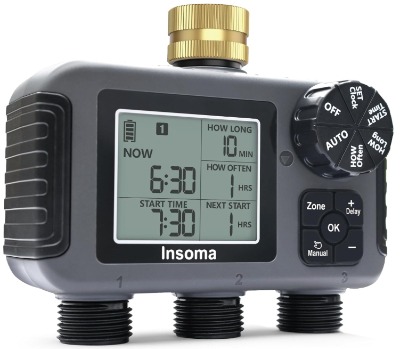
Insoma 3-Zone Sprinkler Timer with Brass Inlet
Product Overview
The Insoma timer is another solid player in the 3-zone space. It combines practical features with smart engineering. The brass inlet and outlet connections maintain pressure and resist corrosion through years of use.
This model emphasizes durability and simplicity. Like the RAINPOINT, it doesn’t require WiFi or apps. You control everything directly on the device through its menu system and buttons. The large LCD display shows your programming clearly.
Best Use Cases
The Insoma timer fits well for anyone needing independent zone control across their property. It excels for yards with multiple distinct watering requirements. You might use it for a front lawn, back patio plants, and a side garden—each with different schedules.
It’s also great for eco-conscious gardeners who want to avoid overwatering. The rain delay feature combined with independent zone control helps you water efficiently without complicated settings.
Key Features Explained
IPX5 waterproof rating keeps water out and electronics safe. This is slightly different from IP65, but still robust. It handles splashes, rain, and outdoor conditions well. Your timer won’t fail because someone watered near it or during a heavy rain.
The programmable auto and manual modes work exactly like they should. Automatic runs your preset schedule. Manual lets you override instantly without changing your programmed timing. It’s like having two different control methods available whenever you need them.
Large LCD display means you can see your settings from several feet away. No need to crouch down or put your glasses on to read the screen. Good readability in sunlight is a huge advantage.
Rain delay functionality prevents your timer from watering right after natural rainfall. Set it to skip watering for a few days and let Mother Nature handle hydration.
Three independent outlets mean three completely separate schedules. You program zone one, then zone two, then zone three. They operate independently and don’t interfere with each other.
Real-Life Usage Insight
Users consistently report that the Insoma timer delivers reliable performance. The build quality feels solid without being overly heavy or complicated. Connections are tight and don’t loosen after repeated use.
Installation is straightforward. Connect to your faucet, attach hoses to each zone outlet, place your sprinklers, and program. Most people get it running in ten to fifteen minutes.
The menu system is logical and doesn’t require a manual for basic setup. Buttons respond crisply and don’t feel mushy or unreliable. Even after a full season of use, the buttons maintain their responsiveness.
Honest Pros and Cons
Pros:
- IPX5 waterproof design protects against moisture
- Three completely independent zone schedules
- Simple, intuitive menu system
- Large, readable LCD screen
- Affordable price
- Quick and easy installation
- Durable brass connections
- Manual override option
Cons:
- No smart home capabilities
- No WiFi or app control
- Battery-powered only (no plug option)
- Limited watering schedule options compared to some models
- Can’t program from your phone while away
Performance Discussion
The Insoma timer performs consistently across different seasons. Water pressure remains steady. Zone switching happens smoothly without interruption. The solenoid valves activate reliably, and water shuts off completely when zones aren’t active.
Longevity is solid. Many users report their Insoma timers lasting three to five years or more with zero issues. The build quality supports extended outdoor use.
Ease of Use Rating
This timer is genuinely easy to use. Most people never consult the manual. The buttons and menu flow logically. You press a button, see options on the screen, and select what you want. It’s intuitive enough for anyone to figure out quickly.
Adding a new zone schedule takes two minutes. Adjusting an existing schedule takes even less time. There’s no complexity here, which is actually its strength.
Value for Money
The Insoma offers solid value at a reasonable price. You get three independent zones, waterproof protection, simple controls, and lasting durability. It costs significantly less than WiFi models while delivering core functionality that works perfectly for most yards.
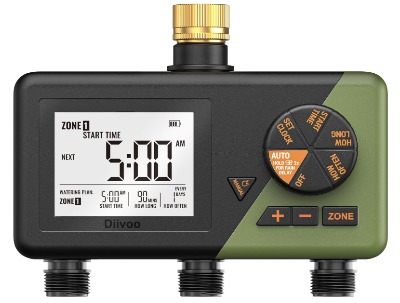
Diivoo Brass 3 Zone Sprinkler Timer
Product Overview
The Diivoo timer brings a different approach to the 3-zone space. It focuses on durability and simplicity while maintaining professional-grade build quality. The brass construction extends beyond just the inlet and outlet—this timer is built to last.
The programmable nature gives you complete control over each zone. You decide exactly when each area waters and for how long. The large display makes programming visible and easy.
Best Use Cases
Diivoo shines for gardeners who want a workhorse timer that doesn’t need batteries frequently and handles varied watering needs. It’s excellent for someone managing a lawn, garden beds, and maybe some shrub areas that all need different watering schedules.
It’s also ideal if you want simple, reliable operation without any smart home integration. Just connect, program, and let it run. No apps. No passwords. No WiFi troubleshooting.
Key Features Explained
The large display isn’t just big—it’s bright and clear in various lighting conditions. You can read your programmed schedules from across the yard. This clarity prevents programming mistakes and makes adjustments quick.
Rain delay prevents your automated system from overwatering after natural rainfall. This feature alone saves water and reduces your utility bill significantly.
Manual mode lets you test zones or water specific areas without disrupting your automatic schedule. Maybe you just planted something and need to give it extra water. Manual mode handles that instantly.
The 3 outlet design is straightforward. Each outlet connects directly to a zone. Zone one, zone two, zone three. No mixing or complicated assignments.
Programmable watering means you set the schedule once and trust it. You don’t reset anything weekly or worry about whether it will run as intended.
Real-Life Usage Insight
Users consistently report that Diivoo timers deliver robust performance. The construction feels premium without the premium price. Connections stay tight through multiple seasons.
Setup is quick. Most people finish in under fifteen minutes. The controls are straightforward, and programming doesn’t require technical knowledge. If you can turn on a faucet, you can program this timer.
Water flow is strong and consistent. Users don’t report pressure loss or weak watering. The brass construction maintains flow rates even under heavy use.
Honest Pros and Cons
Pros:
- Durable brass construction
- Large, clear display
- Programmable independent zones
- Manual mode for instant control
- Rain delay functionality
- Affordable price
- Simple operation
- Strong water flow
Cons:
- No WiFi or smart home integration
- No app control or remote access
- Battery-powered (no hardwired option)
- Can’t program from your phone
- Limited to pre-set watering schedules
- Less flexibility than smart timers
Performance Discussion
Performance is consistently strong across seasons. The Diivoo timer doesn’t have issues with stuck valves or sluggish response. Water flow remains stable. Zone switching happens smoothly.
The durability is impressive for the price. These timers handle outdoor conditions well and maintain functionality for years. No premature failures or reliability issues reported frequently.
Ease of Use Rating
This timer is very user-friendly. You don’t need any special knowledge or skills. The setup takes fifteen minutes tops. Programming a zone schedule takes another ten minutes. Anyone can do this successfully.
The controls are logical. Menu options are clear. Buttons respond instantly. There’s nothing confusing about operating a Diivoo timer.
Value for Money
Diivoo offers excellent value at an attractive price point. You get three independent zones, solid construction, reliable performance, and simple operation. The durability means your investment pays off over multiple years of use.
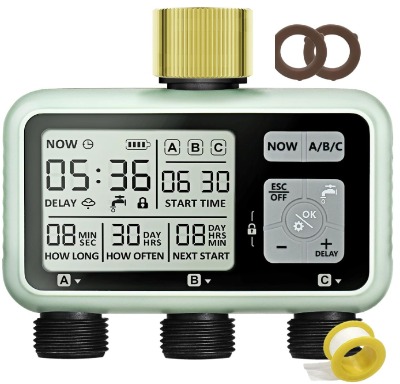
Watering Timer 3 Zone with Brass Inlet (Generic Brand)
Product Overview
This is a straightforward 3-zone timer that focuses on getting the job done without fancy features. Brass inlet and outlet connections provide durability and corrosion resistance. The timer offers the basic functionality every yard needs.
The programmable system lets you set independent schedules for each zone. The display shows your settings clearly. Controls are accessible and easy to understand.
Best Use Cases
This timer is perfect for homeowners who don’t need WiFi, apps, or smart home integration. They just want reliable watering automation at an affordable price. It’s ideal for anyone with three distinct watering zones that need independent schedules.
It works well for people who value simplicity and dependability over features. If your water need is straightforward—water the lawn, water the garden, water the shrubs—this timer handles it perfectly.
Key Features Explained
Rain delay prevents overwatering after rainfall. This simple feature saves water and money.
Manual mode gives you instant control over each zone without affecting your automatic schedule. Need to water something right now? Manual mode handles it instantly.
The 3 outlets connect directly to your three zones. Zone one, zone two, zone three. Setup is straightforward.
The programmable schedule means you decide everything. No defaults. No locked settings. Complete control over watering times and durations.
Brass construction resists corrosion and maintains water flow over time. Your timer won’t clog or degrade quickly.
Real-Life Usage Insight
This timer performs as expected. It’s not fancy, but it’s reliable. Water flows smoothly. Zones switch cleanly. The system runs day after day without problems.
Installation is quick. Connect to your faucet, attach hoses, place sprinklers, program zones. Most people finish in fifteen minutes.
The menu system is basic but functional. You learn quickly where everything is. There’s nothing surprising or confusing.
Honest Pros and Cons
Pros:
- Affordable entry price
- Three independent zones
- Simple, reliable operation
- Easy installation
- Brass connections
- Manual override available
- Rain delay functionality
- Basic but functional controls
Cons:
- No WiFi or app control
- No smart home integration
- Very basic feature set
- Limited customization options
- No remote access
- Can’t program away from home
- Minimal display information
- No advanced scheduling
Performance Discussion
Performance is adequate for basic watering needs. The timer does what it’s designed to do without drama. Water pressure is good. Zones activate and deactivate correctly.
The main limitation is that it’s bare-bones. No extra features means fewer things to break, but also fewer conveniences.
Ease of Use Rating
This timer is simple to use. Programming takes a few minutes. Operating it afterward is straightforward. You don’t need any tech skills or manual reading.
The controls are basic but intuitive. Even a child could figure out how to use this timer.
Value for Money
This timer offers budget-friendly value. You get three zones at the lowest price point. If you want the bare minimum in automatic watering without paying for smart features, this delivers. The durability is decent for the price, though it might not last quite as long as higher-quality models.
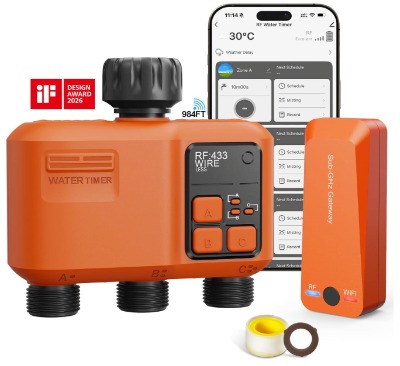
Smart WiFi Sprinkler Timer 3 Zone
Product Overview
This is where things get high-tech. The Smart WiFi timer combines three independent zones with full smartphone control, remote access, and smart home integration. It’s the sprinkler timer for people who want automation, intelligence, and convenience all in one device.
The WiFi connectivity means you control everything from your phone. Set watering schedules from your couch. Adjust zones while you’re at work. Monitor your system from anywhere on Earth.
The 984 feet WiFi range means most large residential properties have strong coverage. The strong wall penetration means the signal reaches even if the timer is on the other side of your house from the router.
Best Use Cases
This WiFi timer is ideal for tech-savvy homeowners who want complete control and flexibility. It’s perfect if you’re away from home frequently. You can adjust watering remotely if weather changes or if you need to water extra.
It’s great for anyone with a smart home setup. Alexa and Google Voice compatibility mean you can voice-control your watering. Just say “Alexa, water the front lawn” and it happens.
It’s also perfect for people who want to track watering history and water usage. The app stores data and shows you trends. You can see exactly how much water you’re using and when.
Key Features Explained
WiFi connectivity lets you control the timer from anywhere. The app is simple and intuitive. You tap buttons on your phone to start zones, adjust schedules, or check status.
The 984 feet range covers most properties. Even if your WiFi router is far from the outdoor timer, the signal reaches reliably. The strong wall penetration helps the signal pass through walls and obstacles.
APP control means smartphone access to every function. Check what’s running. Start a zone manually. Adjust tomorrow’s schedule. All from your phone.
Remote control via the app means you’re never limited by distance. At the store? Adjust watering. On vacation? Run the zones manually. The app is always available.
Alexa and Google Voice compatibility adds voice control. Some people just say their command and water starts. It’s convenient and fun.
Rain delay still prevents overwatering after rainfall. The smart system can even check weather data and automatically implement rain delay if rain is forecast.
Real-Life Usage Insight
Users love the convenience of smartphone control. You can make changes anytime without walking to the timer. That’s a huge advantage for people with large properties or people who are frequently away from home.
Setup is more involved than mechanical timers. You’ll download the app, create an account, connect the timer to WiFi, and then program zones. It takes about thirty minutes total, but most of that is one-time setup.
The app is intuitive once you open it. The interface shows each zone clearly. You see what’s running, what’s scheduled, and what’s available to control.
The WiFi connection is stable for most people. Some users report occasional disconnections, but reconnection happens automatically. The device has local backup control if WiFi fails, so you’re never stuck.
Honest Pros and Cons
Pros:
- Smartphone control from anywhere
- Alexa and Google Home compatible
- 984 feet WiFi range with strong wall penetration
- Remote access while traveling
- Voice control capability
- Rain delay functionality
- Weather monitoring possible with app
- Three independent zones
- Manual and automatic modes
Cons:
- Higher price than mechanical timers
- Requires WiFi setup and account creation
- Occasional WiFi connectivity issues for some users
- App requires smartphone or tablet
- Battery or power requirements
- More complex setup process
- Account security and privacy considerations
- Depends on internet availability
Performance Discussion
Performance varies based on your WiFi setup. With strong WiFi, the timer performs flawlessly. With weak WiFi, you might experience occasional delays or disconnections.
Zone control is responsive. Starting a zone manually happens almost instantly. Scheduled watering happens exactly on time.
The smart features work well. Weather integration is useful if you’re in a location that gets frequent rain. The app provides useful data about watering patterns and water usage.
Ease of Use Rating
Initial setup is moderate complexity. You need to connect to WiFi, download the app, and create an account. This takes about fifteen minutes if you’re comfortable with technology. Programming zones in the app takes another fifteen minutes.
Once set up, ongoing use is extremely easy. The app is intuitive and straightforward. Controlling your zones becomes second nature.
For non-tech people, the setup might be frustrating. But once it’s running, even beginners can use the app easily.
Value for Money
This timer costs more than mechanical alternatives, but the smart features justify the price for many people. If you value remote control, voice integration, and smartphone convenience, the investment pays off in flexibility and peace of mind.
If you’re home most of the time and rarely adjust your watering schedule, a mechanical timer offers better value. But if you travel, have a large property, or love having complete control, this smart timer is worth the premium price.
Comparison Insights: Finding Your Perfect Fit
All five timers do the core job—automatic watering of three independent zones. But they serve different needs and budgets.
Price vs. Features: The mechanical timers (RAINPOINT, Insoma, Diivoo, and the generic brand) cost significantly less than the WiFi model. They deliver core functionality at budget prices. The WiFi timer costs more but adds smartphone control and smart home integration.
Build Quality: All five emphasize brass construction for durability. The RAINPOINT, Insoma, and Diivoo models seem to have slightly more refined construction. The generic brand is solid but more basic. The WiFi model is comparable in physical build.
Ease of Setup: The mechanical timers are fastest to set up. Usually fifteen minutes from box to running. The WiFi timer takes thirty minutes due to app setup and WiFi configuration.
Control Methods: Mechanical timers offer direct control via buttons. The WiFi timer offers remote smartphone control plus voice commands. It’s the most flexible for people who want options.
Reliability: All models report good reliability. Mechanical timers are simpler, so fewer things can fail. The WiFi timer is more complex but generally reliable if your WiFi is stable.
Best for Traveling: The WiFi timer wins hands-down. You can adjust watering while away. Mechanical timers can’t be adjusted remotely, but they run reliably on preset schedules.
Best for Simplicity: The mechanical timers excel here. No apps. No accounts. No WiFi. Just setup and forget.
Best for Water Savings: All models have rain delay. The WiFi model adds weather monitoring, which can maximize water efficiency.
Best Overall Value: The RAINPOINT and Insoma models offer the best balance of features, quality, and price for most people.
Buying Guide: How to Choose Your 3 Zone Sprinkler Timer
Step 1: Assess Your Yard Layout
Count your watering zones. Do you need three separate schedules? Most yards do. Your lawn, your flower beds, and your vegetable garden probably have different water needs.
Measure the distance from your outdoor faucet to each zone. Longer distances might need higher water pressure, which all these timers provide.
Step 2: Determine Your Control Preference
Do you want to control your timer from your phone? Choose the WiFi model.
Do you prefer simple, no-tech operation? Choose a mechanical timer.
Are you home most of the time and rarely adjust watering? Mechanical timers are perfect.
Are you frequently away from home? WiFi control becomes very valuable.
Step 3: Consider Your Budget
Mechanical timers cost less. Budget roughly $25 to $60.
The WiFi timer costs more. Budget roughly $80 to $150.
Your savings on water bills will offset the cost within one to two seasons, so the investment pays off regardless of choice.
Step 4: Evaluate WiFi Availability
For the smart timer, you need strong WiFi coverage in your yard. If your WiFi barely reaches your outdoor faucet, the smart timer might disconnect frequently.
Mechanical timers don’t need WiFi, so they work perfectly even in homes with poor WiFi coverage.
Step 5: Think About Reliability Needs
All these timers are reliable. Mechanical timers have simpler mechanics, so they have fewer failure points. The WiFi timer is reliable but depends on your home WiFi network.
If WiFi reliability is questionable in your home, stick with mechanical timers.
Step 6: Consider Future Features
The WiFi timer offers weather monitoring, water usage tracking, and voice control. These aren’t essential, but they’re nice if you want to geek out about your watering data.
Mechanical timers offer zero bells and whistles, which appeals to many gardeners.
Who Should Buy These Products?
The RAINPOINT 3 Zone Timer: Best for homeowners wanting reliable, straightforward watering automation. You want simplicity, good build quality, and fair pricing. You’re not interested in WiFi or apps.
The Insoma 3 Zone Timer: Best for budget-conscious gardeners who refuse to sacrifice quality. You want a durable, reliable timer at the lowest possible price. You prefer simple operation.
The Diivoo Brass 3 Zone Timer: Best for gardeners who value durability and solid construction. You want a timer that lasts years without fuss. You appreciate good build quality at reasonable pricing.
The Generic 3 Zone Timer: Best for bare-minimum budgets. You want the cheapest possible 3-zone timer that works. You’re okay with basic features if the price is right.
The Smart WiFi 3 Zone Timer: Best for tech-savvy homeowners who travel or want maximum flexibility. You want smartphone control, voice commands, and remote access. You’re willing to pay more for these conveniences.
Common Mistakes to Avoid
Mistake 1: Not Planning Your Zones Correctly
Don’t just randomly assign areas to zones. Think carefully about water needs. Group plants with similar requirements together. Your lawn might need different watering than shade areas or new plantings.
Plan before buying. Three zones should match three distinct areas of your property.
Mistake 2: Forgetting About Water Pressure
Some hose layouts lose water pressure over long distances. If your zones are very far apart, make sure your timer has sufficient water pressure to handle all three zones.
Test water pressure at each zone location before setting final schedules.
Mistake 3: Ignoring the Rain Delay Function
Rain delay prevents overwatering after natural rainfall. Use it whenever rain falls. Overwatering harms plants and wastes water. A simple rain delay click saves resources.
Mistake 4: Setting Fire-and-Forget Schedules
Don’t program your timer and never adjust it. Seasons change. Plant needs change. Weather patterns shift. Review your schedule monthly and adjust as needed.
Mistake 5: Choosing Smart Timer Without Checking WiFi
The smart WiFi timer is worthless if your WiFi doesn’t reach your yard. Check WiFi coverage in your outdoor spaces before buying a smart model.
Mistake 6: Not Testing Before Relying Completely
Program your timer, then watch it run a few times. Make sure zones activate correctly. Make sure water flow reaches all plants. Make sure nothing overflows or misses its targets.
Test everything before leaving your property or going on vacation.
Mistake 7: Forgetting Battery Maintenance
Mechanical timers use batteries. Check batteries before each season. Replace them if needed. A timer without batteries won’t run, and you’ll come home to dead plants.
The smart WiFi timer might need power for WiFi functions. Check charging status regularly.
Mistake 8: Ignoring Seasonal Changes
Your watering needs change throughout the season. Spring growth requires different watering than summer dormancy. Fall preparation requires different timing than spring startup.
Adjust your timer quarterly as seasons change.
Mistake 9: Not Securing WiFi Passwords
The smart timer connects to your WiFi network. Use a strong password and secure network. Don’t leave your WiFi open or use weak passwords.
Your watering timer connects to your home network, so security matters.
Mistake 10: Assuming More Features Equal Better Value
Smart features are nice but not necessary. If you never use them, they don’t add value. Sometimes a simple mechanical timer serves you better than a fancy smart model.
Buy what you’ll actually use, not what sounds impressive on the box.
Performance Comparison Table
| Feature | RAINPOINT | Insoma | Diivoo | Generic | Smart WiFi |
|---|---|---|---|---|---|
| Price | $$$ | $$ | $$$ | $ | $$$$ |
| Waterproof Rating | IP65 | IPX5 | Good | Good | Good |
| Zone Control | 3 Independent | 3 Independent | 3 Independent | 3 Independent | 3 Independent |
| WiFi Control | No | No | No | No | Yes |
| Smartphone App | No | No | No | No | Yes |
| Voice Control | No | No | No | No | Yes |
| Rain Delay | Yes | Yes | Yes | Yes | Yes |
| Manual Mode | Yes | Yes | Yes | Yes | Yes |
| LCD Screen | Large | Large | Large | Basic | App |
| Battery Life | Excellent | Good | Good | Good | Varies |
| Setup Time | 10 min | 10 min | 10 min | 10 min | 30 min |
| Best For | Simplicity | Budget | Durability | Minimal Budget | Tech Users |
Final Verdict: Which 3 Zone Sprinkler Timer Should You Buy?
Here’s the honest truth: all five of these timers will improve your watering situation. You’ll spend less time worrying about hydration. Your plants will be healthier. Your water bill will likely drop.
Choose the RAINPOINT 3 Zone Timer if you want the best balance of quality, features, and price. This timer has the largest LCD screen, reliable operation, and excellent waterproof rating. It’s our top recommendation for most homeowners.
Choose the Insoma 3 Zone Timer if you’re budget-conscious but refuse to compromise on quality. It delivers solid performance at the lowest reasonable price. Great value.
Choose the Diivoo Brass 3 Zone Timer if you want premium-feeling construction that lasts years. The build quality justifies the price. Excellent durability.
Choose the Generic 3 Zone Timer if your budget is extremely tight and you just need basic functionality. It works, but don’t expect fancy features or long lifespan.
Choose the Smart WiFi 3 Zone Timer if you travel frequently, want smartphone control, or dream of voice-commanding your watering system. The convenience is worth the premium for the right person.
The Real Bottom Line
The most expensive timer isn’t always the best choice. The cheapest timer might disappoint. The sweet spot for most homeowners is a mechanical timer with solid build quality and fair pricing.
The RAINPOINT and Insoma models sit in that sweet spot. They’re affordable, reliable, and feature-rich without being overcomplicated.
Don’t let perfect be the enemy of good. Any of these five timers will dramatically improve your yard watering situation. Pick one that fits your budget and control preferences, then enjoy greener grass and healthier plants while the timer handles the work.
Your future self—the one enjoying a beautiful yard without the watering hassle—will thank you for making this investment today.
Frequently Asked Questions
How long do 3 zone sprinkler timers last?
Well-made timers last five to ten years with basic maintenance. The RAINPOINT and Diivoo models tend toward the longer end of that spectrum. Battery changes keep them running smoothly.
Do I need professional installation?
Absolutely not. These timers connect to standard outdoor faucets. Anyone can install them in fifteen minutes. No special tools needed. No plumber required.
Can I expand beyond three zones?
Not with these specific timers. But you can daisy-chain timers together if you need more zones. Just connect one timer to your faucet, then connect another timer to one of the first timer’s outlets. It’s unconventional but works.
What if my water pressure is too high?
Overly high pressure can damage hoses or spray systems. All these timers have pressure regulation, but you might need a pressure reducer if your water pressure exceeds 80 PSI.
Do I need to drain the timer before winter?
If you live where temperatures drop below freezing, you should drain your timer and hoses before winter. Water expands when frozen and can damage components. Drain completely and store your hoses indoors.
Which timer uses the least electricity?
Mechanical timers use battery power only for the timer clock. The WiFi timer might use more power for WiFi connectivity. For most homeowners, the power difference is negligible.
Can I program different schedules for different days?
Yes. All these timers let you program completely different schedules for each zone. Zone one might water daily, while zone two waters twice weekly.
What if I forget to implement rain delay after rainfall?
Your plants get overwatered this time. It’s not ideal, but one overwatering won’t kill established plants. Just use rain delay next time. Over time, this becomes habit.
Are these timers suitable for vegetable gardens?
Absolutely. Vegetables often need consistent watering, and a timer ensures they get it. Program a zone for vegetables with daily watering, and they’ll thrive.
Can children or pets break these timers?
They’re durable, but intentional destruction might damage them. Accidental bumps and splashes are fine. The waterproof design handles normal outdoor use, including contact with children and pets.
Conclusion
A 3 zone sprinkler timer isn’t a luxury. It’s a practical tool that saves you time, saves water, and improves your yard’s health.
Whether you choose the reliable RAINPOINT, the budget-friendly Insoma, the durable Diivoo, the bare-minimum generic brand, or the high-tech WiFi smart timer, you’re making an investment in your landscaping’s future.
Stop dragging hoses. Stop worrying whether you watered enough. Stop wasting water on overwatering. Let a 3 zone sprinkler timer handle the work while you enjoy the results.
Your greener lawn, healthier garden beds, and lower water bills will thank you. Start looking at these timers today and transform your yard tomorrow.

Hi, I’m Mary, the founder of GardenCure.com. I’m passionate about creating healthy, beautiful gardens and well-kept lawns. I share practical experience and trusted advice on garden and lawn gear that truly works. With the support of my dedicated research team, our writers produce honest, in-depth reviews using reliable, authentic sources—helping you choose the right tools with confidence for your outdoor space.